سجّل دخولك كتاجر لرؤية الأسعار
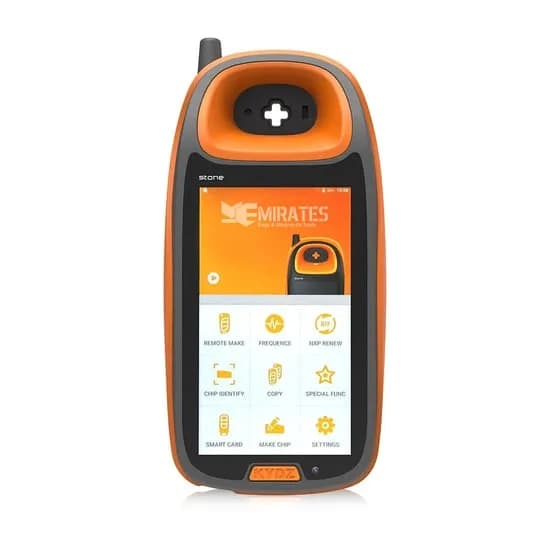
KYDZ Stone Smart Key Programmer Supports Remote Test Frequency Update Support To Create Chip Recognition - Smart Card Creation KYDZ Stone Smart Key Programmer Description: KYDZ Stone Smart Key Programmer Supports Remote Test Frequency Update Support To Create Chip Recognition - Smart Card Creation Car Remotes Key Programming Tools From KYDZ with Product Number: sk20301 This Weight Product: 1050g KYDZ STONE Remote Generator – Key Maker – Chip Cloner device Android Handheld Supports Remote Test Frequency-Refresh Generate Chip Recognition-Smart Card Generate KYDZ Stone Smart Key Programmer Functions: 1. Chip Identification, Copy and Generation 2. Anti-theft Data write Key 3. Remote Generation 4. Support Frequency Detection, Infrared Detection 5. NXP Renew 6. Smart Card Generation Power On and Off: 1.Power on: press the battery button in 3 to 5 seconds, entering the Android screen, then click the “agree”. 2.Power off: press the battery button in 2 to 3 seconds,appearing the word “power off”, then click the “power off”. Home Page Description: 1. Active message showing: show the new message of KYDZ 2. Remote making: producing the RKE remote key. 3. Detecting the frequency and infrared. 4. NXP renew: OEM and after market is supported. 5. Chip identify:recognize the chip,edit,read the EEPROM. 6. Copy:(still research and develop). 7. Special function:(still research and develop). 8. Smart card:producing all kinds of PKE remote keys. 9. Making chip:G make,G mass,ID67,ID68,ID70,ID70E,ID33,ID40,ID4, ID42,ID43,ID44,ID45,ID46,ID60,ID61,ID62,ID63 and so on. 10. Setting: wifi setting,display setting, volume setting, language setting, PC mode. KYDZ Stone Smart Key Programmer Using Instruction: 1. Remote Making Please check if the battery of the RKE remote key can work before making, then clicking the “remote make”—–choose the area—-choose the type of car—-enter the screen of remote make—-put the RKE remote key into the Key slot—-appear the word “connect the remote key”—-click generate—remote making—–read successful—-confirm. 2. Detecting Frequency (1)Detecting Frequency: click “frequency”—–put the remote key near this machine—-press the button of the remote key—-appearing relative information of the key. (2)Detecting Infrared:click “frequency”—–put the remote key near this machine—-press the button of the remote key—-appearing information. 3. NXP Renew Click“NXP renew”—-choose the area—-choose the type of the car—–enter the screen and connect the circuit—–use the PS2 wire to connect the port of the PS2——–click “refresh/update”——-reading the chip——read successful—-click “confirm” 4. Chip Identity (1)Click “chip identity”—–put the chip into the Key slot—-click chip identify—–recognizing—-finished—-showing the information of chip—click “chip edit” (2)Click “chip identity”—–out the chip into the key slot——click “EEPROM”—-click “read the data of EEPROM” 5. Copy: (still research and develop). 6. Special function: (still research and develop). 7. Smart Card Please check if the battery of the RKE remote key can work before making, then clicking the “remote make”—–choose the area—-choose the type of car—-enter the screen of remote make—read PKE remote key—adjust it until it display the “PKE remote key”—-click “generate”–confirm 8. Making Chip (1)Car model:put the chip into the key slot—-click “make chip”—-car model—-choose the area—-choose the type of the car—-click “Importing files”—confirm—-back to the last interface—click “generate”–confirm (2)Image generator:put the chip into the key slot—-click “make chip”—click “image generator”—choose G producing as your need. (3)Unlock: put the chip into the key slot—–click “make chip”—–click “unlock”—-choose the area—-the the type of the car— detecting the battery—detecting the data of the factory—-reset the chip. 9. Setting (1)WIFI setting: click “setting”—click “wifi setting”—-choose the internet——connect (2)display setting:click “setting”—click “display setting”—-adjust the light of the screen as you want (3) volume setting:click “setting”—click “volume setting”—-adjust the volume of the screen as you want (4)language setting:click “setting”—English/Chinese (5)PC mode:connect to the computer (6)About: showing the version of this machine KYDZ Stone Smart Key Programmer Parameter 1.Size: 5.0 inch 2.Battery: 5000mAh/3.7V 3.Charging: DC 5V/1A 4.Using environment: -10°C—55°C KYDZ Stone Smart Key Programmer includes: 1 set x KYDZ Smart Key Programmer